Free Online Bulk Image Resizer
Batch resize, optimize, watermark, and download images.
Click to upload or drag & drop
PNG, JPG, WEBP, GIF supported
Release to drop files!
Free Bulk Image Resizer — Blimic
Resizing multiple images can be time-consuming — especially when you need perfect quality for websites, blogs, or social media. According to Google Developers, optimizing images can dramatically improve your site’s speed and user experience.
With Blimic’s Free Bulk Image Resizer, you can resize, convert image, and optimize hundreds of images right in your browser — no upload, no data tracking, 100% private and free forever.
It supports modern formats like WebP and AVIF for better quality and smaller file size.
✨ Key Features
- 🔄 Bulk Image Resizing: Resize multiple images at once — save time and effort.
- ⚡ No Quality Loss: Compress and resize without damaging image clarity.
- 🌐 Supports Modern Formats: Convert to WebP or AVIF for smaller, faster-loading images.
- 🔒 Privacy First: 100% client-side. Your images never leave your computer.
- 🖋️ Add Watermark: Protect your work or brand easily with a custom watermark.
- 📁 ZIP Download: Get all resized images in one click — neatly packed in a ZIP file.
- 🚫 Upload Limits: Enjoy a clean, distraction-free experience.
⚙️How to Use the Free Bulk Image Resizer (Step-by-Step)
Using Blimic’s tool is incredibly easy — no signup, no software needed.
Follow these simple steps to resize your images online: 👇👇
- Upload Your Images
Click the Upload Images button or drag and drop multiple files at once. The tool supports all common formats like JPG, PNG, WEBP, and AVIF. - Set Dimensions or Choose Presets
Enter your preferred width and height, or pick from preset sizes (ideal for web, blog, or social media). - Select Output Format
Choose between JPEG, PNG, WebP, or AVIF. For faster websites, WebP and AVIF are highly recommended. - Adjust Image Quality
Use the quality slider to balance size and clarity. For example, 80% quality often gives sharp visuals with minimal file size. - Enable Keep Aspect Ratio (Optional)
Maintain the original proportions of your images to avoid distortion. - Add a Watermark (Optional)
Enter custom text (like “© blimic.com”) to protect your photos before sharing online. - Click “Resize Images”
Hit the button — the tool instantly resizes all your images in bulk. - Download Your Results
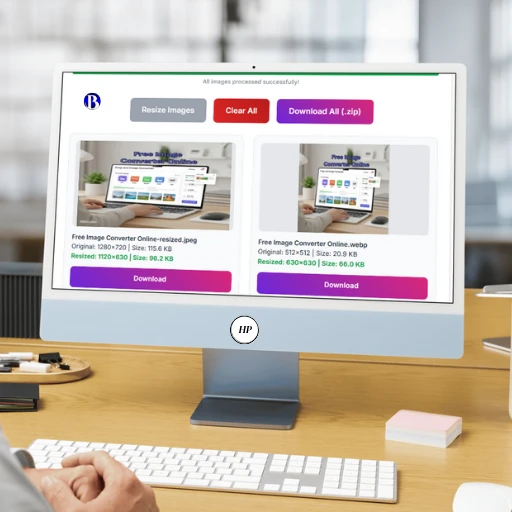
View resized previews, check the new file size, and download all images at once as a ZIP file.
That’s it. Fast, private, and perfectly optimized images in just a few clicks.
🌍 Who Should Use Our Tool?
- Bloggers & Content Creators:
Optimize images for blogs or thumbnails to improve page speed. - Web Developers:
Prepare lightweight images before uploading to websites. - E-commerce Sellers:
Make product photos crisp yet light for faster product pages. - Photographers & Designers:
Export multiple images with consistent size and watermark. - Social Media Managers:
Resize images to platform-specific dimensions in one go.
💡 Why Use Free Bulk Image Resizer Tool?
Images take up most of a website’s total size. Heavy or unoptimized images can slow down your website, increase bounce rates, and even affect Google rankings.
That’s where Blimic’s Free Bulk Image Resizer helps.
It’s not just about making images smaller — it’s about making them load faster, look sharper, and perform better across every platform. Whether you’re a blogger, designer, or developer, this tool gives you full control over your visuals.
Here’s why using an online image resizer matters:
- Boost Website Speed:
Smaller image files load faster, improving user experience and SEO performance. Google loves lightweight pages. - Save Storage & Bandwidth:
Reduce hosting space and data usage — ideal for websites with lots of media. - Better for SEO & Ads:
Optimized images improve your site’s Core Web Vitals, helping you rank higher and maintain Adsense approval. - Professional Quality:
WebP and AVIF formats maintain high quality while cutting size by up to 70%. Perfect for modern web projects. Modern formats like WebP🔗 and AVIF offer smaller file sizes without losing visual quality. - Privacy Guaranteed:
Since Blimic tools run directly in your browser, your images stay private — nothing is uploaded to any server.
So, whether you’re a web developer, content creator, or photographer, this tool helps you resize and optimize images without losing quality.
📸 Why Image Resizing Is Important
Images are a major part of every website and app, but large image files can make your site slow, affect SEO ranking, and consume unnecessary bandwidth.
That’s why an image resizer tool like “Free Bulk Image Resizer” is essential for: –
- 🌐 Web Developers: Reduce page load time and improve Google Core Web Vitals🔗 score.
- 🛍️ E-commerce Sellers: Display optimized product photos for faster checkout and better UX.
- 🖋️ Bloggers & Content Writers: Improve SEO and reader experience with properly sized visuals.
- 🎨 Graphic Designers: Export different sizes for web, print, and social platforms.
- 📱 Social Media Managers: Prepare images for each platform (Instagram, Facebook, X, etc.) instantly.
In short, a powerful image resizer like Blimic,s Free Bulk Image Resizer helps you keep your images light, fast, and professional without sacrificing clarity.